Posts

Game prototype

Image
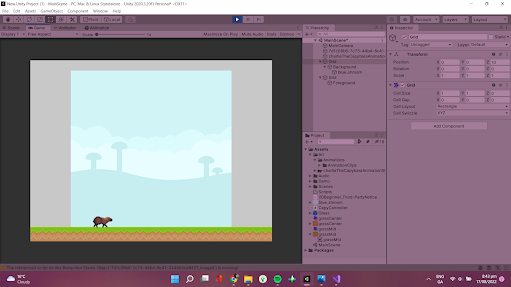
 At this point in my project I have created a basic outline of my game. So far I have implimented the basic aspects of my game. Those basic elements are, making my script for movement, creating a basic outline of my background and foreground, adding my player character and creating my colliders for the ground and the player character. These are the most basic yet important elements of this game and without these elements I cannot begin to add my more complex elements. I used the skills I learnt while creating my tutorial game to create my movement script. Because I already had experience making a movement script I found this part of the project very simple and I had no issues creating this script and having it run properly. I also used the skills I learnt from the tutorial project to create the grass in the foreground using a sprite pallet. This method made creating the foreground incredibly easy as I just had to import the sprites for the grass and ground and then painted them int...

My chosen game

 I have chosen to create an endless catcher game for my project. I will be using skills I learnt from following the tutorial that I completed as well as other online resourses in order to create this game. My aim for this game is to make it something that can be picked up and played for short periods of time as a quick break. Although the idea is simple in my research I have found that while creating this game I will have to include some more complex elements such as boundaries for my game, physics for the falling object and a way to spawn the objects so I do expect to encounter some challenges along the way. My vision for the final product The first thing I had to do once I settled on this game idea was deciding what the subject of my game would be. What would the player character look like? what would you be catching? how would you win/loose? I decided that I wanted my playable character to be some sort of an animal, the animal could not be able to fly because that would make the...

Planning for my game

Image
 My aim for the game I am creatin is to create something that is simple yet entertaining. I am using flash games and mobile games as my inspiartion. I want to create something that will keep the player playing the game while not making the game overly complex because I believe that this is an effective approach to game design. At the moment I have a few ideas. Idea 1, A catcher game My first idea is for an endless catcher game. The aim of this game would be to see how long you can last playing before you meet the requirements to end the game. These end requirements could be something like catching too many of a certain item or possibly loosing too many items to an enemy. This game takes inspiartion from the various mini games in the Mario Party series where the aim of the mini game was to catch the most amount of an item in order to win.  Fruit Forecast from Super Mario Party Idea 2, A pet simulator My final project for the first semester was a pet simulator game, unfortuantly...

Planning for my chapter

Image
 The section I have chosen to work on is ' The Digital History of Games' I chose this topic because I find this very interesting. I have a good bit of knowledge of this in terms of consoles and games released between the mid 90s and now. I feel that this would be an interesting topic that I will continue to be engaged with. For research on my chosen topic I intend on using a variety of sources, like historical sources, documentaries and literary sources. I aim to use a wide range of sources while I am collecting refrences and research so that I can have a range of different perspectives. I am starting by looking for methods of research that will be beneifical to me. While looking for research methods I found this article , which provides a variety of different research methods and advice on how to ensure that you will complete your research in a timely manner.  Planning Because I have to write a chapter of a book I began to research how to write a book. I found this  arti...

Unity tutorial 9

Image
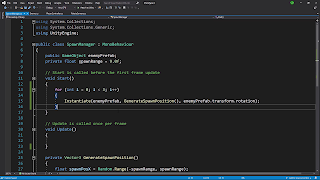
an example of my code  In this weeks unity tutorial I learned how to create a game where you control a ball that will go into your enemies net and the enemy will try to do the same to you. I also learnt how to spawn waves of enemies using the spawn manager. I acheived this by using C# scrips. The first tutorial I did this week was a particularly challenging one because there was not as many insructions given with it so I had to use my skills that I have learnt over the last few weeks to complete it. It was very satisfying to do this as I can see that my skills and understanding of unity have grown so much since I started.

Blog feedback

Image
 Over the last few weeks I have received many comments on my blog from my peers giving me feedback on my work. I have found this incredibly helpful as it has given me an outside perspective on my work. I'm very happy with the feedback that I have gotten over the last few weeks. Many of the comments I have gotten about my game have been incredibly positive and many of the commenters have been very excited about my game idea. This positive feedback has inspired me to continue developing ideas for my game because I now have a small group of people who are looking forward to my finished product. I also enjoy giving others feedback on their blogs, I find that it helps me to look at what work that others are doing. I think that seeing the work that others are doing helps me come up with new ideas, viewing others work has always inspired me and being able to see the methods that others use while working helps me find new ways to work.  feedback Viewing others blogs and giving and rec...

Week 9 reading

Image
 The reading tasks I have done over the last few weeks have been a great benefit to me. They have worked to help me further understand many different concepts within game design and development. I have learned about many new things like what a GDD is and why its so important to the process of game development. I look forward to learning more about the process of game design and development in the other readings that I will do. writing

Game fun

Image
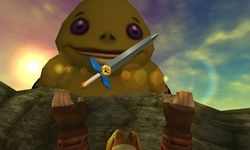
The Biggoron sword  This weeks reading tasks focus on how elements of a game work to make a game something enjoyable and fun. In the  first article , the topic of 'gameification' is discussed. Gameification is the idea of turning tasks into something entertaining, this is seen throughout games. In my opinion this is seen most commonly in what are known as 'fetch quests' in games. A fetch quest is when you are tasked with bringing an item to a character for some sort of reward. An amazing example of the gameification of a fetch quest is t he quest to forge the Biggoron sword in The Legend of Zelda: Ocarina of Time. This is a long enough quest that requires you to trade many different items with many different characters in order to finally be able to forge the sword. There is a section in the quest where you need to deliver some eye drops to the Goron in order for him to forge the sword for you but the eye drops will go bad after a certain amount of time. This time limi...

Unity week 7

Image
A screenshot of my C# code  In this weeks tutorial I learned how to create more realistic animations in my game and how to add particle effects and sound effects to my game. This tutorial will be helpful for when I go onto developing my own game because of how I can now make more visually realistic effects in my games. Making the character look more like they are actually running makes the game appear more polished which is something that I would like to achieve with my game. Although basic elements like functional code is important I would argue that this extra layer of polish is important because it makes the games look more put together and more complete. 

Game decisions

Image
The articles I read this week focused on influencing players to make decisions while playing your game and how gaming effects the player. Many games use subtle techniques to influence you to go a certain direction or carry out a specific task. A great example of a game that does this is  The Legend of Zelda: Breath of The Wild , although the game is open ended and allows for and encourages the player to make their own choices while playing there is one section of the game where you are ' forced ' into carrying out a very specific set of tasks. The opening section of the game takes place in the great plateau, a section of land raised above the rest of Hyrule. In this section you are challenged with completing three shrines and collect three upgrades for your Shieka slate before you can continue. This is a positive example of a game controlling your choices, you are still free to approach the challenge ahead of you in any way but you must complete the task ahead of you before you...

Tech tips- creating photo collages

Image
  My collage Creating collages with Fotor Collages are a great way to make the photos you add to your blog more interesting. If you have a few photos that all fit together a collage can help save space on your page as well as being a more interesting way to display the images. You can follow these simple steps to create your own collage- Head to  Fotor . Pick out a template that inspires you or fits with the theme of your blog. Pick out the photos you want to add. Create your collage and download it. This simple method allows for you to create more interesting blog posts.

Games GDD

Image
This weeks reading tasks focused on understanding what game design documents are and why they're so important when it comes to designing a game. Prior to this week I had never heard of what a game design document was before. Learning about them has been very interesting, I found that this  article  was very helpful when it came to understanding the need for a GDD. This article broke down the elements involved in creating a GDD and why they are so important. A GDD must outline all elements of the game so the mechanics, story, characters, theme, progression, main demographic and other significant elements. A GDD is used as a point of reference while developing a game, it ensures that the project does not go off track while in development and remains true to the initial concept of the game.  An example of the benefits of using a GDD Using a GDD has many benefits, this  article  outlines many of these benefits. In my opinion the main benefit of using a GDD is that i...

Link to my GDD

 Here is a link to my GDD that I will be working on while creating my game!  My GDD will outline the various plans I have for creating my game and will act as my roadmap while developing my game. I will be updating this regularly as I progress in the development of my game. 

Week 6 Unity tutorial

Image
Screenshot of my C# script  In this weeks unity task I learned how to make the background of my game move by as the game is being played. I did this by using C# code to make the background repeat in order to look like it is continuously moving as the game is being played. This method will be helpful when it comes to creating my game if I choose to use this kind of background. I found this tutorial very interesting because I always wondered how this was achieved while I was playing games. 

Reading week unity task

Image
Screenshot of my C# code   In this weeks Unity tutorial I continued to work on the prototype that I began last week and I also began to work on another prototype where I added music and sound effects to the prototype. In the first task I added new elements to my game from last week. I used C# to create a new way of spawning the animals, instead of spawning them by using the S key I instead used C# to spawn them by using a timer. Every few seconds an animal will spawn in the game. In this tutorial I also learned to add collision to the animals in the game so they will react when they collide with each other. In the second unity tutorial I learned about adding music and sound effects to the games that I create. This will be incredibly beneficial to me when I am creating my own game because of how important music and sound effects are to setting a mood in a game.

Tech Tips- creating cheezeburger meme

Image
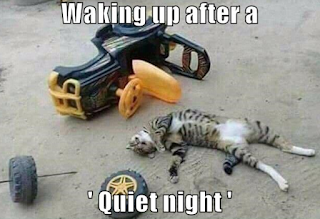
 Creating a cheezeburger meme Meme's are a fun way to add a bit of comedy to your blog. You can very easily give your readers a laugh with this simple meme format. My cheezeburger meme Creating one of these memes is so easy, all you have to do is follow these simple steps. Head to  cheezeburger builder Make an account Pick a photo to use as your template Fill out the text boxes Upload your meme to the site! Although it's a simple process it leaves you with an amazing addition to your blog

Vision statement

Image
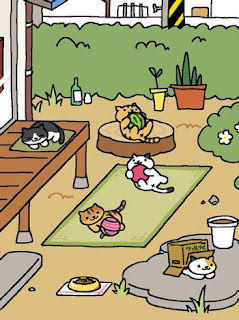
 Introduction ' cat game ' is a cat collecting simulator game for Switch and PC that blends the cat collecting of ' Neko Atsume ' with the friendship building of ' Animal Crossing '. Cat Game is set in the home of your choice where you will adopt, befriend and connect with a variety of cats. Description In Cat Game you move into your dream home and fill it with as many cats as possible. You first pick a home from a collection of starters, later on in the game you will have the opportunity to relocate to a larger home to fit more of your new found friends. You can decorate your home to your liking but remember that certain cats have specific preferences and if you don't meet them you'll be in for a nasty surprise.  Example of the home decoration and cat collection seen in Neko Atsume link Cats can be adopted at your local adoption center. Initially you can only adopt one cat but as your bond grows so too can your cat collection. You can adopt a variety ...

Week 5 unity tutorial

Image
Screenshot of my prototype  This weeks unity tutorial involved me starting a new project. This project focuses on a game with a more defined goal. My first prototype was a very basic game with no win or lose state and very minimal features. This project is more advanced and it better represents a finished game. This tutorial began by covering basic player movement which includes moving left, right, forward and backwards while also insuring that the player character stayed within the bounds of the playable space in the game. I then learned how to make the player character throw the piece of food using the spacebar, I did this by using a C# script. I then went onto learn how to make the animals spawn when the S key is pressed and to then change the perspective of the camera when the animals spawn in. 

Tech Tips - creating GIFs

Image
 Making GIFs GIFs are a great way to spice up the content on your blog, they are a more interesting way to view content on your blog. Here's a GIF I made from some photos of my friends and I on some recent nights out! All photos taken by me! If you would like to make your own animated GIF you can do so by following these simple steps! 1- Pick out the photos you want to use. 2- Head to  gifmaker 3- Upload the photos you chose. 4- Adjust the settings on your GIF i.e. the speed, if the GIF loops and the size of the GIF 5- Download your GIF It's an incredibly simple yet effective tool to make your blog posts more unique. I hope this inspires some of you to create some GIFs and add them to your blogs.

Game idea research

Image
 Researching ideas for my game The game idea that I'm focusing on in this post is my idea of a cat simulator. Based on some of the feedback I've received from my classmates I believe that this would be a very interesting and entertaining game. Screenshot of neko atsume link The first idea for one of the possible game mechanics for my game is to include a feature where you can ' collect ' different cats. I imagine this being like the cat collection feature in the game  Neko Atsume . This feature would allow for me to include a range of different kinds of cats with different personalities, likes and dislikes. This would keep the game fresh on repeat playthroughs. I would implement this by having different kinds of cats appear periodically in the adoption center. Another possible mechanic I would like to include would be a feature where you can develop relationships with the cats you adopt. I imagine this being similar to the friendship mechanic in animal crossing where y...